
Runtime errors
The Application Was Unable to Start Correctly (0xc000007b): Find the 32-bit/64-bit DLL Mismatch in an MFC App
You double-click an MFC program and this message box appears instead of the main window:
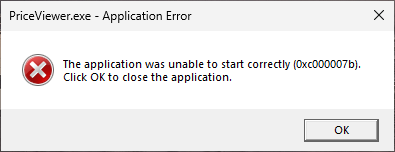
After you click OK, the process ends with exit code 0xC000007B. None of your code has run: InitInstance was never reached, so the app writes no log, and a breakpoint in your code is never hit.
What 0xc000007b means
0xC000007B is STATUS_INVALID_IMAGE_FORMAT (NTSTATUS values). Windows tried to map an EXE or DLL into the process and could not use it. In an MFC app the usual reason is the bitness: a 64-bit process can load only 64-bit DLLs, and a 32-bit process only 32-bit DLLs.
The DLLs your program links through an import library (PriceCalc.lib for PriceCalc.dll, for example) are loaded while the process starts, before CWinApp is created. If one of them was built for the other architecture, the start fails there. Both directions give the same message box:
| EXE | DLL in the EXE’s folder | Result |
|---|---|---|
| x64 | x64 | Starts |
| x64 | x86 | 0xc000007b |
| x86 | x64 | 0xc000007b |
The message does not name the DLL. Windows looks for a DLL in the folder the application was loaded from before the system folders and PATH (DLL search order), so start with the DLLs that sit next to the EXE. This often happens when a 32-bit copy of a DLL is left over from before the project was moved to x64, or when a copy step still takes the DLL from the Win32 output folder.
Read the machine type of each file
Open a Developer Command Prompt for VS (it has dumpbin on its path), go to the folder you run the program from, and check the EXE and each DLL:
dumpbin /headers PriceViewer.exe | findstr /c:"machine ("
dumpbin /headers PriceCalc.dll | findstr /c:"machine ("
For the program in the message box above, the first command prints 8664 machine (x64) and the second prints 14C machine (x86).
8664 is x64 and 14C is x86 (the machine values in the PE format). The EXE is 64-bit and PriceCalc.dll is 32-bit, so PriceCalc.dll is the file to replace. Run the same command on every DLL you ship in that folder, including third-party ones, and replace each file that shows a different value from the EXE.
Put the matching DLL next to the EXE
Replace the DLL with a build for the same platform as the EXE:
- If the DLL is a project in your solution, open Build > Configuration Manager and check the Platform column for the DLL project. With the solution platform set to x64, the DLL project should also say x64, not Win32. Then check that the post-build event, installer, or script that copies the DLL takes it from the x64 output folder.
- If the DLL comes from a vendor, get its x64 build (or its x86 build for a 32-bit EXE). A 32-bit DLL cannot be converted; it has to be built for x64.
After the replacement, run dumpbin again. When every file in the folder shows the same machine value as the EXE, the mismatch in that folder is gone.
A DLL loaded with LoadLibrary fails with error 193
A DLL that you load at run time with LoadLibrary does not produce the message box. LoadLibrary returns NULL, and GetLastError returns 193, ERROR_BAD_EXE_FORMAT, “%1 is not a valid Win32 application.” (system error codes). Despite the wording, the DLL is a normal Windows DLL; it was built for the other architecture.
If you only check for NULL, a plug-in of the wrong bitness looks like a missing file. Log the error code:
// strAppDir: the folder of the EXE, ending with a backslash
CString strPath = strAppDir + _T("PriceCalc.dll");
HMODULE hCalc = ::LoadLibrary(strPath);
if (hCalc == nullptr)
{
	DWORD dwError = ::GetLastError();
	CString strMsg;
	strMsg.Format(_T("Could not load %s (error %lu)."), (LPCTSTR)strPath, dwError);
	AfxMessageBox(strMsg);   // 193: the DLL was built for the other architecture
	return FALSE;
}
When no message box appears
The message box does not appear when SEM_FAILCRITICALERRORS is set. When the program is started by another process that has turned off these boxes with SetErrorMode(SEM_FAILCRITICALERRORS), the child inherits that setting: nothing appears, and the program exits at once with exit code 0xC000007B. If a launcher, scheduler, or script reports that exit code, check the bitness of the files in the program’s folder in the same way.