
GDI
BitBlt vs StretchBlt in MFC: Shrink an Image Without Losing Lines Using HALFTONE
You keep an invoice page in a memory bitmap and show it in two places: at full size, and as a small preview that fits in a pane. The full-size copy looks right. The preview, drawn with StretchBlt, either turns the text into black smudges or drops most of the table lines, depending on how the DC was set up. The bitmap itself is fine. How a shrink combines pixels depends on the stretch mode of the DC you draw to.
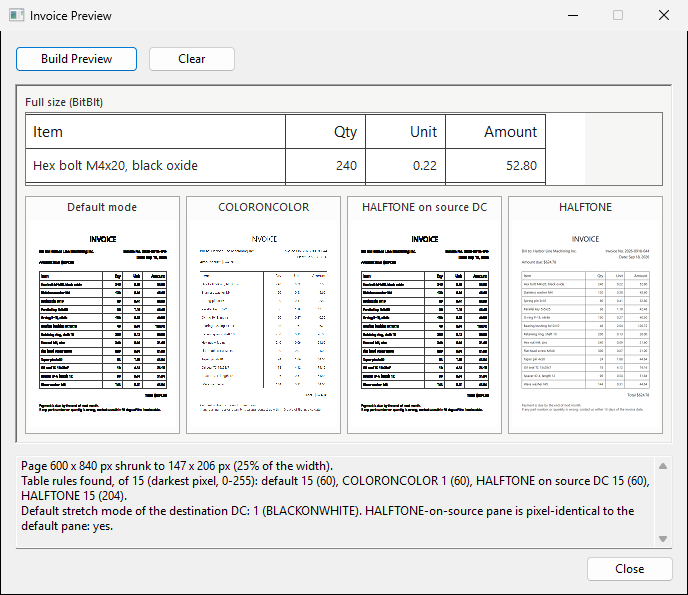
BitBlt copies at the same size
CDC::BitBlt takes one width and one height. The source rectangle and the destination rectangle are the same size, so every pixel is copied as it is and there is nothing to set besides the raster operation. The strip at the top of the screenshot is drawn this way:
// BitBlt: the source and destination rectangles have the same size.
void CPagePreview::DrawFullSize(CDC& dc, const CRect& rcStrip)
{
	CDC pageDC;
	pageDC.CreateCompatibleDC(&dc);
	CBitmap* pOldBitmap = pageDC.SelectObject(&m_page);

	const int cx = min(rcStrip.Width(), kPageWidth - kTableLeft);
	const int cy = min(rcStrip.Height(), kPageHeight - kTableTop);
	dc.BitBlt(rcStrip.left, rcStrip.top, cx, cy,
		&pageDC, kTableLeft, kTableTop - 2, SRCCOPY);

	pageDC.SelectObject(pOldBitmap);
	dc.Draw3dRect(&rcStrip, RGB(120, 120, 120), RGB(120, 120, 120));
}
m_page is the 600 × 840 bitmap of the page. It is selected into a memory DC so it can be the source, and the old bitmap is selected back before the memory DC is destroyed. The source position (kTableLeft, kTableTop - 2) picks the top of the table, so the strip shows part of the page instead of all of it.
StretchBlt scales, and the destination DC decides how
CDC::StretchBlt takes a width and height for each side. When they differ, the bitmap is stretched or compressed to fit, “according to the stretching mode currently set in the destination device context” (StretchBlt). When a 600 × 840 page goes into 147 × 206 pixels, about four source rows and four source columns end up in each destination pixel. The stretch mode decides what that pixel becomes (SetStretchBltMode):
| Mode | What happens to the rows and columns that are dropped |
|---|---|
BLACKONWHITE (STRETCH_ANDSCANS) |
Combined with the kept pixel by a Boolean AND of the color values. Dark pixels win. |
WHITEONBLACK (STRETCH_ORSCANS) |
Combined by a Boolean OR. Light pixels win. |
COLORONCOLOR (STRETCH_DELETESCANS) |
Deleted. Only the kept rows and columns are copied. |
HALFTONE (STRETCH_HALFTONE) |
Averaged. Each block of destination pixels gets about the average color of the source pixels it covers. |
A new display DC starts in BLACKONWHITE (Display Device Context Defaults). The memory DC that the sample draws into also reported BLACKONWHITE (1) before anything set it, so the “Default mode” pane is a BLACKONWHITE shrink.
What each mode does to the invoice
All four panes shrink the same page to the same 147 × 206 pixels. The table on the page has 15 horizontal rules, each one pixel thick and 34 pixels apart. The sample walks down a column of each pane where only those rules cross, and counts how many are still darker than the paper:
| Pane | Rules found (of 15) | Darkest pixel per rule, averaged (0 = black, 255 = white) | Text |
|---|---|---|---|
Default mode (BLACKONWHITE) |
15 | 60 | Thick black blobs |
COLORONCOLOR |
1 | 60 | Broken strokes, gaps |
HALFTONE set on the source DC |
15 | 60 | Same as Default mode |
HALFTONE |
15 | 204 | Light gray, letter shapes kept |
With BLACKONWHITE, any dark pixel among the four rows that meet survives the AND, so every rule stays at its full darkness. Text has dark strokes close together, and those merge too, which is why the words turn into solid bars. The AND works on color values, so with colored artwork the merged pixel can come out darker or in a different hue than either source pixel.
With COLORONCOLOR, three of every four rows are thrown away. A one-pixel rule stays only if its row happens to be one that is kept. On this page that was true for one rule out of 15. Thin strokes in the text are lost the same way.
With HALFTONE, a one-pixel rule is averaged with the white rows around it, so it becomes a light gray line instead of disappearing or growing. Every rule is still there, and the text keeps its shape at a size where it can be recognized.
Set HALFTONE on the destination DC, then the brush origin
Call SetStretchBltMode(HALFTONE) on the DC whose StretchBlt you call, which is the destination, and set the brush origin right after it. The Microsoft page for SetStretchBltMode says that an application must call SetBrushOrgEx after setting HALFTONE, or brush misalignment occurs. The sample calls the Win32 function on GetSafeHdc(); CDC::SetBrushOrg does the same and returns the previous origin. Both settings stay on the DC, so the sample restores them after the copy:
// StretchBlt: the destination DC's stretch mode decides how rows and
// columns of the source are combined when the page is shrunk.
void CPagePreview::DrawShrunk(CDC& dc, const CRect& rcImage, int nStretchMode)
{
	CDC pageDC;
	pageDC.CreateCompatibleDC(&dc);
	CBitmap* pOldBitmap = pageDC.SelectObject(&m_page);

	int nOldMode = 0;
	POINT ptOldOrg = { 0, 0 };
	if (nStretchMode != 0)
		nOldMode = dc.SetStretchBltMode(nStretchMode);
	if (nStretchMode == HALFTONE)
		::SetBrushOrgEx(dc.GetSafeHdc(), 0, 0, &ptOldOrg);

	dc.StretchBlt(rcImage.left, rcImage.top, rcImage.Width(), rcImage.Height(),
		&pageDC, 0, 0, kPageWidth, kPageHeight, SRCCOPY);

	if (nStretchMode == HALFTONE)
		::SetBrushOrgEx(dc.GetSafeHdc(), ptOldOrg.x, ptOldOrg.y, NULL);
	if (nStretchMode != 0)
		dc.SetStretchBltMode(nOldMode);

	pageDC.SelectObject(pOldBitmap);
}
The sample passes 0 for the “Default mode” pane, so that pane is drawn with whatever mode the DC already has. In your own code you would call it with HALFTONE only.
HALFTONE does more work per pixel than the other modes. For one preview that is not noticeable, but if you redraw many thumbnails on every scroll, shrink each image once into a bitmap of the preview size and BitBlt that bitmap afterward.
Setting the mode on the source DC does nothing
The memory DC that holds the page is the natural place to look when you write the setup code, and SetStretchBltMode accepts any DC without an error. The third pane does exactly this:
// The common mistake: the mode is set on the DC that holds the page.
pageDC.SetStretchBltMode(HALFTONE);
dc.StretchBlt(rcImage.left, rcImage.top, rcImage.Width(), rcImage.Height(),
	&pageDC, 0, 0, kPageWidth, kPageHeight, SRCCOPY);
The sample compares this pane with the Default mode pane pixel by pixel, and they are identical. If switching to HALFTONE changes nothing on screen, check which DC the call goes to.
When the shrunk image still looks wrong
- The image is upside down or mirrored. The width of the source and the width of the destination have different signs, or the heights do.
StretchBltmirrors the image in that case. Check for aCRectwhoserightis smaller thanleft, or a negative height from a bottom-up calculation. - The preview gets worse each time it is updated. The code shrinks the previous preview again instead of the original bitmap. Every pass loses more detail, so always stretch from the full-size source.
- Nothing is drawn. The source memory DC has no bitmap selected, or the bitmap was created with zero width or height. Select the bitmap into the memory DC before calling
StretchBlt, and check the return value, which is zero on failure.