
Custom draw
Change CListCtrl Row and Cell Colors in MFC with NM_CUSTOMDRAW
You show a list of jobs in a report-view CListCtrl and want failed jobs to stand out in red. OnCtlColor does not help here: in the dialog below, the dialog’s OnCtlColor was called 0 times for either list. CListCtrl::SetTextColor and SetTextBkColor change every row at once. To color one row, or one cell, handle the NM_CUSTOMDRAW notification that the list sends to its parent while it draws.
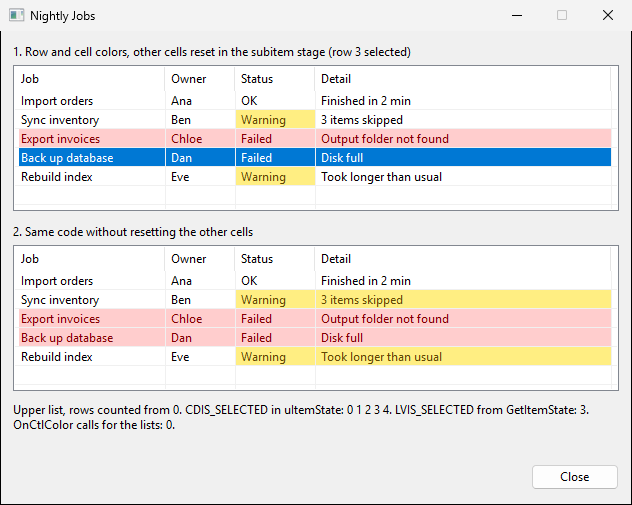
In the upper list, the Failed row is red across all columns, only the Status cell of each Warning row is yellow, and the selected Failed row (row 3, counting from 0) keeps the normal blue highlight. The lower list runs the same code but does not reset the other cells of a Warning row, so the yellow also spreads into the Detail column. The text under the lists shows what the upper list reported while it drew.
Color a whole row
Add an ON_NOTIFY entry for NM_CUSTOMDRAW in the dialog’s message map. The notification arrives several times per paint, and dwDrawStage tells you which stage it is.
// JobsDlg.cpp
ON_NOTIFY(NM_CUSTOMDRAW, IDC_LIST_JOBS, &CJobsDlg::OnCustomDrawJobs)

void CJobsDlg::OnCustomDrawJobs(NMHDR* pNMHDR, LRESULT* pResult)
{
    NMLVCUSTOMDRAW* pDraw = reinterpret_cast<NMLVCUSTOMDRAW*>(pNMHDR);
    *pResult = CDRF_DODEFAULT;

    switch (pDraw->nmcd.dwDrawStage)
    {
    case CDDS_PREPAINT:
        *pResult = CDRF_NOTIFYITEMDRAW;  // ask for one notification per row
        break;

    case CDDS_ITEMPREPAINT:
    {
        const int nRow = static_cast<int>(pDraw->nmcd.dwItemSpec);
        if (m_listJobs.GetItemState(nRow, LVIS_SELECTED) & LVIS_SELECTED)
            break;  // leave the selected row to the default highlight

        const CString sStatus = m_listJobs.GetItemText(nRow, 2);
        if (sStatus == _T("Failed"))
        {
            pDraw->clrText = RGB(128, 0, 0);
            pDraw->clrTextBk = RGB(255, 205, 205);
            *pResult = CDRF_NEWFONT;  // the colors apply to every cell in the row
        }
        else if (sStatus == _T("Warning"))
        {
            *pResult = CDRF_NOTIFYSUBITEMDRAW;  // ask for one notification per cell
        }
        break;
    }

    case CDDS_ITEMPREPAINT | CDDS_SUBITEM:
        if (pDraw->iSubItem == 2)
        {
            pDraw->clrText = RGB(96, 72, 0);
            pDraw->clrTextBk = RGB(255, 238, 130);
        }
        else
        {
            pDraw->clrText = ::GetSysColor(COLOR_WINDOWTEXT);
            pDraw->clrTextBk = ::GetSysColor(COLOR_WINDOW);
        }
        *pResult = CDRF_NEWFONT;
        break;
    }
}
The first notification of each paint has CDDS_PREPAINT. If you return CDRF_DODEFAULT there, the list draws itself and sends no more custom draw notifications for that paint, so you never see the rows. Return CDRF_NOTIFYITEMDRAW, and the list sends CDDS_ITEMPREPAINT before each row, with the row index in nmcd.dwItemSpec.
In the row stage, put the colors in clrText and clrTextBk of the NMLVCUSTOMDRAW structure and return CDRF_NEWFONT. A list view takes its colors from these two members, not from SetTextColor and SetBkColor on nmcd.hdc. With CDRF_NEWFONT returned from the row stage, the colors are used for every cell of the row (About Custom Draw).
Color one cell and reset the others
To color only the Status cell, return CDRF_NOTIFYSUBITEMDRAW from the row stage. The list then sends CDDS_ITEMPREPAINT | CDDS_SUBITEM before each cell of that row, with the column index in iSubItem (0 for the first column) (NM_CUSTOMDRAW (list view)).
Set colors for every cell in that stage, not only for the cell you want to change. The lower list sets colors when iSubItem is 2 and leaves the other cells alone. The Job and Owner cells, which come before Status, keep the default colors. The Detail cell, which comes after it, is drawn with the yellow set for Status, because nothing changed the colors between the two cells. The upper list sets the system window colors for every other cell, and only Status is yellow.
Leave the selected row to the highlight
The handler checks GetItemState(nRow, LVIS_SELECTED) and returns without setting colors for the selected row, so the list draws its usual highlight.
nmcd.uItemState also has a CDIS_SELECTED flag, but it is not a reliable way to find the selected row here. While the upper list drew, uItemState had CDIS_SELECTED set for all five rows, and GetItemState reported only row 3 as selected.
Summary
- Handle
NM_CUSTOMDRAW, returnCDRF_NOTIFYITEMDRAWfromCDDS_PREPAINT, and setclrTextandclrTextBkfor each row. - For a single cell, return
CDRF_NOTIFYSUBITEMDRAWand set colors for every cell of the row, including the ones you leave at their default colors. - Check the selection with
GetItemState, notuItemState.